import pandas as pd
import numpy as np

from caveclient import CAVEclient
import cloudvolume

import pyvista as pv
import matplotlib as mpl
import matplotlib.pyplot as pltLabel preferred-orientation of synaptic inputs
This example uses the plotting package PyVista for interactive rendering. Any rendering program that takes vertices and edges can work.
Query the functional properties of coregistered cells
The table digital_twin_properties_bcm_coreg_v4 was first released with materialization version v1507. However, we will find the same root at the earlier v1300 for easier mesh loading.
client = CAVEclient("minnie65_public")
client.version = 1926

# Query functional properties, keep value with highest cc_abs
functional_df = client.materialize.tables.digital_twin_properties_bcm_coreg_v4().query(
    select_columns = {'nucleus_detection_v0': ['id', 'pt_root_id'],
                      'digital_twin_properties_bcm_coreg_v4': ['pref_dir','pref_ori','cc_abs'],
                     },
)
print(len(functional_df))
Table Owner Notice on digital_twin_properties_bcm_coreg_v4: For the use of this table please cite: 1) https://doi.org/10.1038/s41586-025-08829-y; Wang et al., 2025 2) https://doi.org/10.1038/s41586-025-08840-3; Ding, Fahey, and Papadopoulos et al., 2025 3) https://doi.org/10.1038/s41586-025-08790-w; MICrONS Consortium et al., 202515780This table includes duplicates on pt_root_id because some cells were recorded in more than one session. For this analysis, we will keep the derived properties from the recording with the highest quality, denoted under cc_abs
# Keep the row with highest cc_abs
functional_df = (functional_df
                 .sort_values('cc_abs', ascending=False)
                 .drop_duplicates(subset='id', keep='first')
                 .reset_index(drop=True)
                )

print(len(functional_df))13090Select an example functional cell
The digital_twin_properties_bcm_coreg_v4 functional table is available from materialization version 1507 onward, so we query it — and the input synapses — at the current public version. The static mesh below, however, comes from the seg_m1300 flat segmentation, so we track the example cell by two root ids: original root_id (valid in the v1300 segmentation) and version_root_id (its current root, used for the functional and synapse queries).
# The example cell, as a root id valid in the v1300 flat segmentation (used for the mesh below)
root_id = 864691135655627458

# The functional data and synapses are queried at the current version, so remap the
# example cell to its current (v1926) root id
timestamp = client.materialize.get_timestamp(client.version)
version_root_id = int(client.chunkedgraph.suggest_latest_roots(root_id, timestamp=timestamp))
print(f"v1300 root id: {root_id}, current root id: {version_root_id}. The root may change between versions with proofreading.  ")

# query the input synapses
syn_df = client.materialize.synapse_query(post_ids=version_root_id)[['id','pre_pt_root_id','post_pt_root_id','ctr_pt_position']]
syn_df.head()
v1300 root id: 864691135655627458, current root id: 864691135811906764. The root may change between versions with proofreading. | id | pre_pt_root_id | post_pt_root_id | ctr_pt_position | |
|---|---|---|---|---|
| 0 | 174174984 | 864691135392563698 | 864691135811906764 | [186856, 191906, 22934] |
| 1 | 162422539 | 864691135885598064 | 864691135811906764 | [178626, 205198, 22722] |
| 2 | 173960580 | 864691135615882692 | 864691135811906764 | [185226, 196182, 22506] |
| 3 | 159219981 | 864691134898719965 | 864691135811906764 | [178500, 106780, 20910] |
| 4 | 189711855 | 864691136911120750 | 864691135811906764 | [195675, 191580, 20316] |
Merge the functional properties to the synapse table
# Combine functional measure to synapse table (preferred orientation)

coreg_syn_ori = (syn_df.merge(functional_df[['pt_root_id', 'pref_ori']],
                              left_on='pre_pt_root_id',
                              right_on='pt_root_id',
                              how='left')
                 .drop(columns={'pt_root_id'})
)

coreg_syn_ori = (coreg_syn_ori.merge(functional_df[['pt_root_id', 'pref_ori']],
                                     left_on='post_pt_root_id',
                                     right_on='pt_root_id',
                                     how='left',
                                     suffixes=['_pre','_post'])
                   .drop(columns={'pt_root_id'})
)

# Drop the synaptic partners without an orientation preference (non coregistered cells)
coreg_syn_ori = coreg_syn_ori.dropna(subset=['pref_ori_pre','pref_ori_post'])


coreg_syn_ori.tail()| id | pre_pt_root_id | post_pt_root_id | ctr_pt_position | pref_ori_pre | pref_ori_post | |
|---|---|---|---|---|---|---|
| 9232 | 159218970 | 864691135977473391 | 864691135811906764 | [177222, 159044, 20627] | 153.240433 | 138.018661 |
| 9257 | 159745553 | 864691136177629702 | 864691135811906764 | [178414, 121410, 21070] | 119.237099 | 138.018661 |
| 9274 | 158924324 | 864691135720809265 | 864691135811906764 | [179370, 105188, 20665] | 5.258744 | 138.018661 |
| 9328 | 165737524 | 864691135215092352 | 864691135811906764 | [179838, 104038, 20625] | 13.710155 | 138.018661 |
| 9329 | 197114781 | 864691135384344043 | 864691135811906764 | [199398, 203886, 22306] | 79.00901 | 138.018661 |
Load the static mesh for one cell
# Set the static segmentaiton source to the most recent flat segmentation where that root id is valid
seg_source = 'precomputed://gs://iarpa_microns/minnie/minnie65/seg_m1300'

# load from cloudvolume
cv = cloudvolume.CloudVolume(seg_source, progress=False, use_https=True)
mesh = cv.mesh.get(root_id, lod=2)[root_id]
# Render the mesh vertices for pyvista
vertices = mesh.vertices
faces = mesh.faces
# add a column of all 3s to the faces
padded_faces = np.concatenate([np.full((faces.shape[0], 1), 3), faces], axis=1)
mesh_poly = pv.PolyData(vertices, faces=padded_faces)
# Flip with y axis
mesh_poly.points[:, 1] *= -1set the color map for orientation
# Legend for orientation map, annotated with the drifting-bar stimulus at each angle.
# a vertical bar (moving right) is 0 deg and orientation increases counter-clockwise.
# Preferred orientation is 180-degree periodic (0 deg == 180 deg).
import matplotlib.patches as mpatches

colormap = plt.get_cmap('hsv', 2056)
ori_norm = mpl.colors.Normalize(0.0, 180.0)   # pref_ori is in degrees [0, 180]

fig, ax = plt.subplots(figsize=(4.6, 3.0))
ax.set_aspect('equal')
ax.axis('off')

# colored half-ring: angular position = preferred orientation (0 deg at right, CCW to 180 deg at left)
r_in, r_out, n = 0.60, 1.0, 180
for i in range(n):
    a0, a1 = 180 * i / n, 180 * (i + 1) / n
    ax.add_patch(mpatches.Wedge((0, 0), r_out, a0, a1, width=r_out - r_in,
                                facecolor=colormap(ori_norm((a0 + a1) / 2)), edgecolor='none'))

# stimulus-bar glyph + label at each major orientation
bar_r, label_r = 1.17, 1.44
bar_w, bar_h = 0.055, 0.26
for deg in [0, 45, 90, 135, 180]:
    a = np.deg2rad(deg)
    cx, cy = bar_r * np.cos(a), bar_r * np.sin(a)
    # a vertical rectangle is orientation 0; rotate it CCW by `deg` to draw the stimulus bar
    rect = mpatches.Rectangle((cx - bar_w / 2, cy - bar_h / 2), bar_w, bar_h, facecolor='k', edgecolor='none')
    rect.set_transform(mpl.transforms.Affine2D().rotate_deg_around(cx, cy, deg) + ax.transData)
    ax.add_patch(rect)
    ax.text(label_r * np.cos(a), label_r * np.sin(a), f'{deg}°', ha='center', va='center', fontsize=10)

ax.set_xlim(-1.75, 1.75)
ax.set_ylim(-0.25, 1.7)
ax.set_title('Preferred orientation', fontsize=12)
plt.show()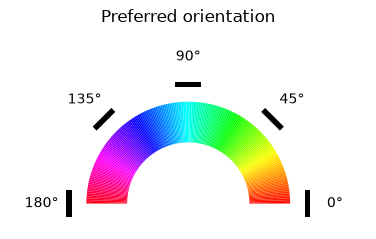
Format the synapse positions
# format the synapse positions
presyn_positions = np.vstack(coreg_syn_ori.ctr_pt_position.to_numpy()).astype(float)
presyn_positions = presyn_positions*np.tile([4,4,40],[len(presyn_positions),1])
pre_syn_poly = pv.PolyData(presyn_positions)

# Flip with y axis
pre_syn_poly.points[:, 1] *= -1

# pref_ori is in degrees [0, 180]. Use a dedicated normalizer here (independent of the colorbar
# cell above) so the point colors always span the full hsv wheel: norm(deg) maps [0, 180] -> [0, 1].
ori_norm = mpl.colors.Normalize(0.0, 180.0)
pre_syn_colors = colormap(ori_norm(coreg_syn_ori.pref_ori_pre))
post_syn_color = colormap(ori_norm(coreg_syn_ori.pref_ori_post))[0]
Initialize plotting object, add mesh and annotations
pv.set_jupyter_backend("client")
plotter = pv.Plotter(image_scale=10)

plotter.add_mesh(mesh_poly, color=post_syn_color, opacity=0.3)
plotter.add_mesh(pre_syn_poly, scalars=pre_syn_colors, rgb=True, point_size=10)

plotter.camera_position = 'zy'
plotter.set_background('#fbfbfb')

plotter.show()